# RCON

{% hint style="warning" %} <mark style="color:red;">**configs/plugins/DU\_Rcon/DU\_Rcon.json**</mark>
{% endhint %}

{% hint style="info" %}
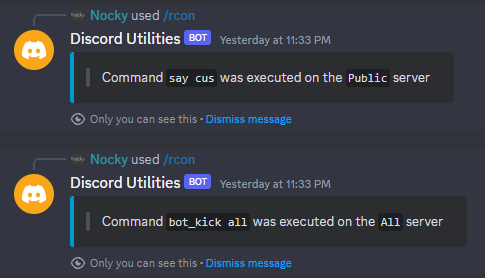
Send commands from your Discord server to your CS2 server using the Rcon Slash Command.
{% endhint %}

<div align="left"><figure><img src="https://799349702-files.gitbook.io/~/files/v0/b/gitbook-x-prod.appspot.com/o/spaces%2FrczaiIR8LCIvnID1U1Ty%2Fuploads%2FCixxXcwDn8YecmhDFl4P%2Frcon.png?alt=media&#x26;token=0864cf20-4dab-40c4-a18f-8745d307405c" alt="" width="364"><figcaption></figcaption></figure></div>

<table><thead><tr><th width="351">Property</th><th>Description</th></tr></thead><tbody><tr><td><strong>Servers List</strong></td><td><p>List the names of all your CS2 servers (if you use multiple servers) </p><p>This is so that when the RCON command is used, the command is sent to the correct server.</p></td></tr><tr><td><strong>Server</strong></td><td>The current server from your <code>Server List</code>, so for example set this server to Public and your other server to Only Mirage.</td></tr><tr><td><strong>Admin Roles ID</strong></td><td>List of roles that can use discord rcon slash command (separate with a comma)</td></tr><tr><td><strong>Discord Rcon Command</strong></td><td>What Slash Command will be created on your discord server</td></tr><tr><td><strong>Discord Rcon Command Description</strong></td><td>Description of the Slash command</td></tr><tr><td><strong>Discord Server Option Name</strong></td><td>The name of the value, to select the server</td></tr><tr><td><strong>Discord Server Option Description</strong></td><td>Description of the select the server option</td></tr><tr><td><strong>Discord Command Option Name</strong></td><td>The name of the value, to write the command</td></tr><tr><td><strong>Discord Command Option Description</strong></td><td>Description of the command name value</td></tr></tbody></table>

{% hint style="success" %}
**To edit the embed, follow the instructions:** [**Custom Embeds Format**](https://docs.sourcefactory.eu/discord-utilities/tutorials/custom-embeds-format)<br>

> Available Variables

**•** <mark style="color:blue;">{COMMAND}</mark> > Displays the executed command\
\&#xNAN;**•** <mark style="color:blue;">{SERVER}</mark> > Display to which server the command was sent
{% endhint %}
